Working well with AI coding tools will matter in your future studies and work, and you don’t need a paid plan to start. This tutorial sets up Codex, OpenAI’s coding assistant for the terminal, to run on OpenRouter’s free models. It takes about ten minutes and costs nothing.
Before you start
- You need a computer with macOS, Windows or Linux, and an email address or a Google account.
- Free models have limits: 20 requests a minute and 50 a day. Every step Codex takes, such as reading a file or running a command, is one request, so a long session can use up a day’s 50. Buying $10 of credits once raises the limit to 1,000 a day.
- Free models may keep what you send. Their providers may store your prompts and train on them, so keep passwords, keys and personal information out of Codex.
1. Make an OpenRouter account
Go to openrouter.ai, click Sign up, and continue with Google or with your email.
2. Allow free models
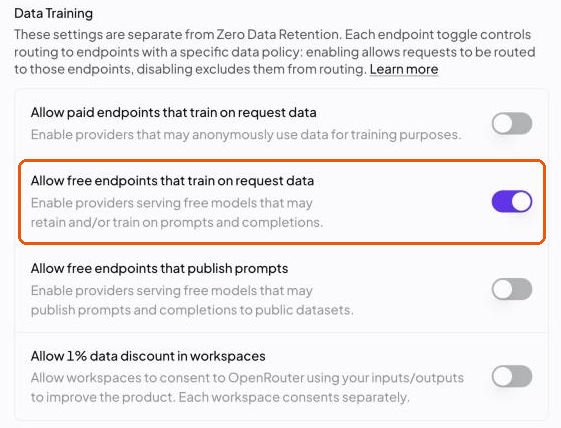
Open Settings → Privacy. Under Data Training, turn on Allow free endpoints that train on request data. Leave the other switches off.
3. Start a new key
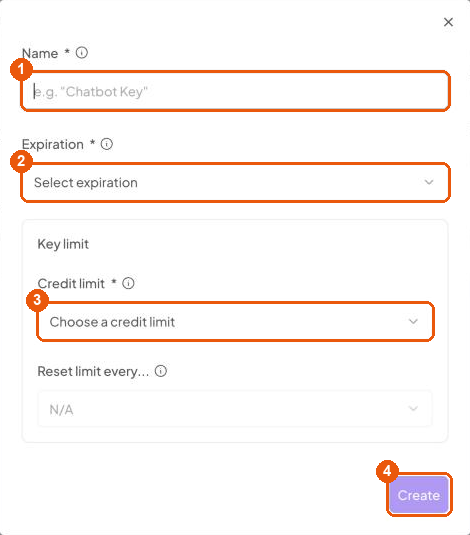
Open Settings → API Keys and click New Key at the top right.

4. Fill in the form
Name: codex. Expiration: 180 days. Credit limit: $50; free models cost nothing, so the limit only matters if you ever buy credits. Then click Create.
5. Enter the verification code
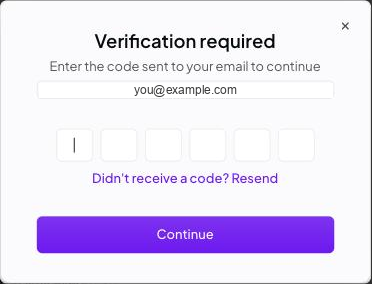
OpenRouter may email you a six-digit code first. Type it in and click Continue.
6. Copy your key
OpenRouter now shows the key: a long line that starts with sk-or-v1-. Copy it and keep this page open until step 9. You see the key only once, and anyone who has it can use your account.
7. Open a terminal
Press Cmd+Space, type Terminal, and press Enter.
8. Install Codex
Copy this command, paste it into the terminal, and press Enter.
curl -fsSL https://chatgpt.com/codex/install.sh | shWhen it asks Start Codex now? [y/N], press Enter. Then close the terminal, open a new one, and check that Codex is there: this prints a version.
codex --version9. Connect Codex to OpenRouter
Copy this whole block, paste it into the terminal, and press Enter. When it asks, paste your key from step 6 and press Enter again.
(
  printf 'Paste your OpenRouter key, then press Enter: '
  read -r KEY
  mkdir -p ~/.codex
  printf '%s' "$KEY" > ~/.codex/openrouter-key
  chmod 600 ~/.codex/openrouter-key
  cat > ~/.codex/config.toml <<'EOF'
model = "openrouter/free"
model_provider = "openrouter"

[model_providers.openrouter]
name = "OpenRouter"
base_url = "https://openrouter.ai/api/v1"
wire_api = "responses"

[model_providers.openrouter.auth]
command = "sh"
args = ["-c", "cat ~/.codex/openrouter-key"]
EOF
  echo "Done. Codex now uses OpenRouter's free models."
)
It saves the key in a file only you can read, openrouter-key, and writes Codex’s settings, config.toml, both in the .codex folder of your home folder. Any Codex settings you had before are replaced. The settings follow OpenRouter’s Codex guide and use the model openrouter/free, which sends each request to one of the free models that can handle it.
10. Start Codex
Go to the folder you want to work in and start Codex there. Use your own folder instead of my-project.
cd ~/my-project
codex
If Codex asks whether you trust the files in the folder, choose Yes. Then ask it something about your code, such as “What does this project do?” To quit, press Ctrl+C twice.
Getting the most out of 50 requests
- Name the place and the design. “In
compiler/codegen.py, compilea // bwith a zero check beforesdiv” takes far fewer steps than “make the tests pass”, and its answer is easier to check. - Ask for a plan before code. “Read
codegen.pyand tell me how you would addwhileloops; don’t edit anything yet.” A plan costs one request; undoing a wrong edit costs several. - Check what it tells you. Run the tests or the program yourself. A free model can sound sure and still be wrong.
- Continue instead of starting over.
codex resume --lastpicks up your most recent session. - Ask one-off questions without a session.
codex exec "What does this project do?"answers once and exits. - See what you have used. OpenRouter’s Activity page lists every request with the model that answered it.
Using one particular model
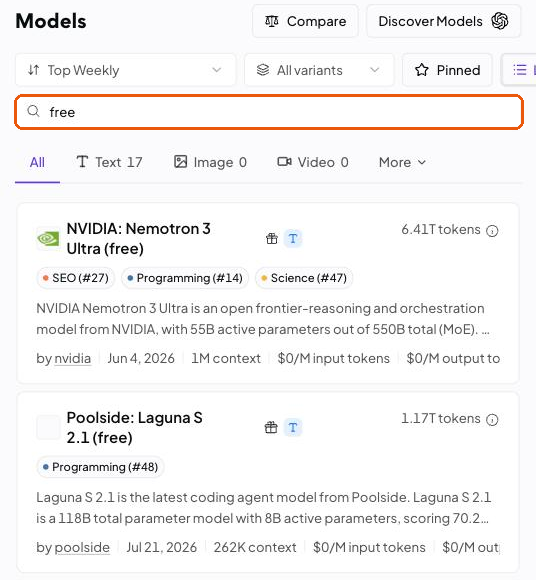
openrouter/free picks a free model at random for each request, so answers can vary in quality. To stay with one model, search for “free” on OpenRouter’s model list, pick a model whose name ends in “(free)” and that supports tool calling, which Codex needs to read files and run commands, and copy its ID. Then start Codex with codex -m followed by the ID. The free list changes every few weeks, so a model that worked last month may be gone; openrouter/free keeps working.
When something goes wrong
Codex retries a failed request five times, showing Reconnecting... 1/5, before it prints the real message.
command not found: codex, or on WindowsThe term 'codex' is not recognized: close the terminal and open a new one.401 Unauthorized: User not found: the key is missing or incomplete. Run step 9 again and paste the whole key.No endpoints found matching your data policy: turn on the switch in step 2.429 Too Many Requests: you reached a free limit. Wait a minute, or until the next day.- Anything else:
codex doctorchecks the installation and the settings.